PRDtoPrototype
PRD → Prototype




▶ Live demo — the example prototype below, hosted and clickable.
Turns a structured PRD (YAML: problem, goals, personas, screens, and the actions connecting them) into a single, dependency-free, clickable HTML prototype — so a PM can put a walkthrough in front of a stakeholder or user before a single line of product code exists.
Built by Larkin Domench as a hands-on product exercise: taking the earliest artifact in the product process — the PRD — and making it interactive enough to test, instead of waiting for a designer or engineer to do that.
Example: a real estate deal intake tool
examples/deal_intake_tracker.yaml specs
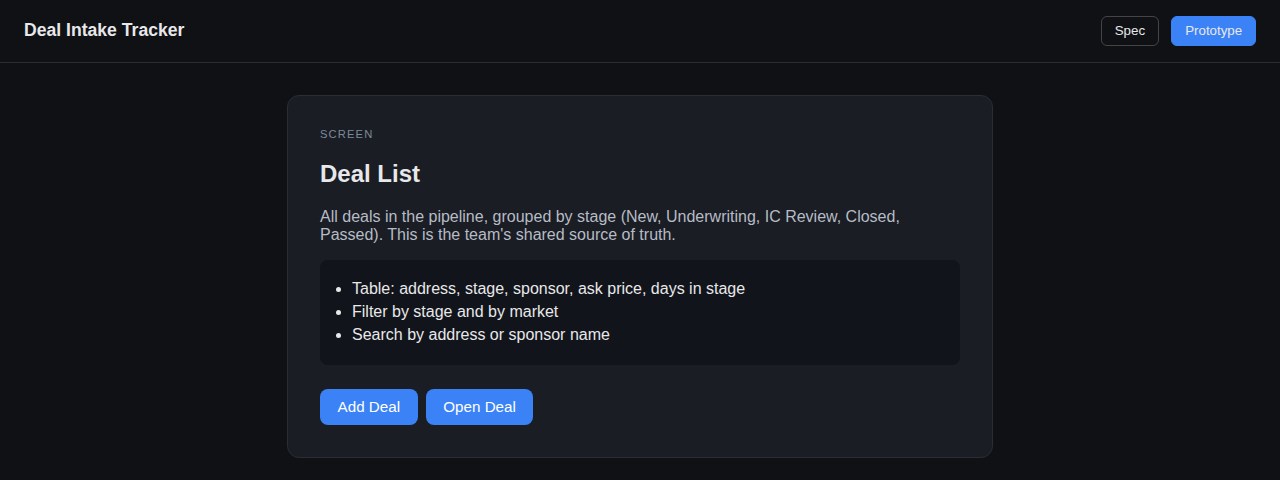
a 4-screen internal tool for an acquisitions team (Deal List → Add Deal →
Deal Detail → Underwriting Summary). Generate and open it:
pip install -r requirements.txt
python build_prototype.py examples/deal_intake_tracker.yaml --out docs/index.html
open docs/index.html   # or: python -m http.server, then visit localhost
Click through it — every button goes exactly where its PRD entry says it should, and the “Spec” tab shows the problem/goals/personas behind it.
Regenerating docs/index.html (the command above) and pushing to main updates
the live demo automatically — Pages is already configured to serve /docs.
The PRD format
title: "Product Name"
problem: "What's broken today, in plain language."
goals: ["Outcome one", "Outcome two"]
personas:
  - name: "Persona"
    needs: "What they need from this"
screens:
  - id: home
    name: "Home"
    description: "What this screen is for."
    key_elements: ["Thing on the screen", "Another thing"]
    actions:
      - label: "Button text"
        goes_to: some_other_screen_id
goes_to must reference another screen’s id — the tool validates this
(and rejects missing titles, screens with no id/name, and duplicate
ids) and fails loudly rather than silently generating a dead prototype.
Key product decisions (and the tradeoffs)
| Decision | Options I weighed | What I chose & why |
|—|—|—|
| Prototype fidelity | Full visual design (Figma-level) vs. structural placeholder | Structural placeholder — each screen shows its name, description, and key elements as a plain list, not a pixel-accurate mock. The point is testing the flow, not the visuals, and it means a PM can produce one alone. |
| Validation | Trust the PRD vs. verify it | Built a validator that checks every goes_to resolves to a real screen and every screen has an id/name — a dangling reference is a broken prototype link, and I’d rather fail the build than ship a dead button. |
| Output format | A framework-based app (React, etc.) vs. one static HTML file | One dependency-free HTML file — no build step, no server, works from file:// or GitHub Pages, and it’s the same pattern as Fire-Calc, so anyone I hand it to can just open it. |
| Input format | A GUI PRD builder vs. plain YAML | YAML — PMs already write PRDs as structured text; a GUI would be a second place to maintain the same information. |
Tech
Python · PyYAML · vanilla HTML/CSS/JS output (no frontend dependencies) · pytest + GitHub Actions CI.
Testing
pip install -r requirements-dev.txt
pytest -v
Covers PRD validation (missing title/screens, duplicate ids, dangling
goes_to targets, missing screen names) and HTML generation (every screen
renders, actions wire to the right target, untrusted PRD content is
HTML-escaped so a screen name can’t inject a script into the prototype).